
KitQuantityField
Decimal field for a quantity with a domain unit.
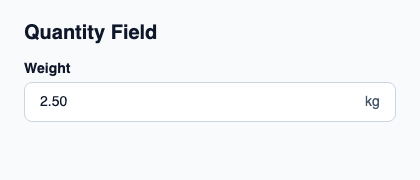
Set a label and, when needed, suffix for the unit. Delegate precision, bounds and validation to the quantity controller.
It preserves KitDecimalField native behavior. It performs no unit conversion and does not turn the draft into a float.
Complete example
This complete Slint file is a visual composition used to produce the screenshot above. Internal strings without a label property retain the kit’s default language; system dialogs follow the host platform. Projected state and callbacks requesting a decision need host wiring; the standalone fixture does not supply that controller. Set up the Rust project, then see the typed controller application for working editing, validation and selection.
// SPDX-License-Identifier: GPL-3.0-or-later
// Display projections are fixtures. Validate accepted domain values in Rust.
import { KitQuantityField, KitTheme, KitThemes } from "@kit/kit.slint";

export component Example inherits Window {
    title: "KitQuantityField example";
    preferred-width: 420px;
    preferred-height: 180px;
    max-width: 100000px;
    max-height: 100000px;
    background: root.theme.canvas;
    in-out property <KitTheme> theme: KitThemes.light;
    in-out property <string> status;
    VerticalLayout {
        padding: 24px; spacing: 16px; alignment: start;
        Text { text: "Quantity Field"; color: root.theme.text-primary; font-size: 20px * root.theme.text-scale; font-weight: 600; }
        KitQuantityField { theme: root.theme; label: "Weight"; text: "2.50"; suffix: "kg"; edited(value) => { root.status = "Draft: " + value; } }
        if root.status != "": Text { text: root.status; color: root.theme.text-secondary; font-size: 12px * root.theme.text-scale; wrap: word-wrap; }
    }
}
Public API
Inherits KitDecimalField. The declarations below come from the component source. Parent properties remain available; see the controller guide for state management.